Measured guide · in-house test data
What Image Metadata Can Reveal Before You Share
An image can carry data beyond visible pixels. Depending on the camera and editing workflow, metadata may describe capture time, device details, orientation, editing software, or geographic coordinates. That information can be useful—but not always appropriate for a public upload.
By Prashantkumar Kishanrao Sundge · Published · Reviewed
What this guide establishes
- GPS coordinates in an ordinary phone photo can identify a home or workplace to within a few metres. This is the metadata risk that matters most.
- Metadata removal is not anonymity. The visible content of a photograph can identify a place or person regardless of what the file headers say.
- 'None detected' means the scan found nothing it recognises, not that nothing is there. The check is deliberately conservative.
- Stripping metadata also removes the orientation tag — which is fine only if the rotation was applied to the pixels first.
- Keep the original. A cleaned derivative is for sharing; the original is your archive, and the two should not be the same file.
Common metadata categories
EXIF is a structured metadata system used by cameras and image software. It can contain technical capture details and an orientation instruction. GPS is a specific sensitive category that may contain latitude, longitude, altitude, or direction fields when a device recorded them.
ICC profiles describe color interpretation and are not location data, but removing them can change how specialized workflows display color. XMP can contain editing or descriptive information. Decide whether you need an archival master before stripping everything from a derivative.
It is worth knowing roughly what a full EXIF block can contain, because the breadth surprises people. Beyond the obvious timestamp and camera model, it commonly holds the lens, focal length, aperture, shutter speed, ISO, flash state, white balance, and the camera's serial number. Editing software frequently adds its own name and version. Some devices record the direction the camera was pointing.
Individually most of these are harmless. Collectively they form a fingerprint. A camera serial number links every photograph taken with that device; a software version narrows down who processed it; a timestamp places a person somewhere at a particular moment. None of this is visible when you look at the picture.
Why GPS is the category that matters
If a phone had location services enabled for its camera, ordinary photographs carry the coordinates where they were taken, typically accurate to within a few metres. A photograph taken at home carries the home address. A photograph of a child carries wherever the child was.
The exposure is not hypothetical and not rare. People post photographs publicly every day without knowing the coordinates are attached, and reading them requires no special skill — the information is in a standard field that any image tool can display.
The specific risk pattern worth understanding is aggregation. One photograph gives one location. A collection of photographs from the same account gives a pattern: where someone lives, where they work, what time they leave, where their children go to school. Each individual file seems innocuous; the set is not.
Many platforms strip metadata on upload, which has led to a widespread assumption that this is handled automatically. It is not consistent. Some platforms strip it, some keep it, some strip it from the displayed copy while retaining the original, and file-sharing services and email attachments generally do not strip anything at all. Relying on the recipient to remove it is not a strategy.
What the browser preflight reports
The local preflight searches supported file structures for recognizable EXIF, GPS, orientation, ICC, and XMP indicators. It reports categories rather than exposing every value in the interface. The check occurs before the file is sent for preparation.
This scan is conservative. Vendor-specific blocks, encrypted data, sidecar files, or metadata stored in an uncommon container location may not be fully parsed. 'None detected' is not a forensic guarantee.
Reporting categories rather than values is a deliberate choice. Displaying exact GPS coordinates in a web interface would mean putting sensitive data on screen, into browser memory, and potentially into a screenshot or a screen recording, in order to tell you something you can act on without seeing it. Knowing that location data is present is sufficient to decide to remove it.
The check runs entirely in your browser, before anything is transmitted. That ordering matters for a privacy tool: you learn what the file contains while it is still only on your own machine, and you decide whether to proceed.
How prepared copies are rebuilt
The backend opens the image, applies EXIF orientation to the pixels, resizes or crops if requested, and saves a new JPEG, PNG, or WebP without copying EXIF/GPS data. Output headers report whether metadata was found and whether warning conditions occurred.
The approach is rebuilding rather than deleting, and the distinction is meaningful. Selectively deleting fields from an existing file leaves the rest of the structure intact, including anything the deleting tool did not recognise. Decoding the image to raw pixels and encoding a fresh file means the output contains only what the encoder wrote — there is no inherited structure for unrecognised data to survive in.
The orientation ordering is what makes stripping safe. Removing the orientation tag from a file whose pixels are still stored rotated would produce an image that displays sideways everywhere. Applying the rotation to the pixels first and then writing a file with no tag produces an image that is upright everywhere, with nothing left to misinterpret.
Keep the original if capture metadata, provenance, color-managed print behavior, or legal evidence matters. Use the cleaned derivative for the public or third-party upload.
When you should keep metadata
Stripping is not always right, and treating it as automatically virtuous causes its own losses. Photographers rely on capture settings to learn from their own work — reviewing which aperture and shutter speed produced a result is impossible once the fields are gone.
Copyright and attribution information lives in metadata. A photographer who embeds their name and licence terms in the IPTC or XMP fields loses that assertion when a file is stripped. For professional work, the metadata is part of the deliverable.
Evidentiary and documentary uses need the timestamp and, sometimes, the location. An insurance claim photograph, a site survey, a compliance record, or anything that might be questioned later is weakened by having its provenance removed.
Archival collections should retain everything. Metadata is often the only record of when and how an image was made, and it cannot be reconstructed later. The rule that resolves all of these cases is the same one stated throughout: keep the original intact and strip the derivative you are sharing.
What removing metadata does not do
Metadata removal protects against one specific disclosure channel. It does nothing about the photograph itself, and it is important not to mistake a clean header for anonymity.
A picture of your street shows your street. Recognisable landmarks, house numbers, vehicle registration plates, reflections in windows, distinctive interiors, and identifiable people are all visible content, unaffected by anything done to the file's headers. Someone determined to work out where a photograph was taken will usually be working from the image, not the metadata.
Nor does it protect against the surrounding context. A photograph posted with a caption, at a particular time, on an account with a history, is interpreted alongside all of that. The file may be clean and the disclosure complete anyway.
There are also technical limits worth stating plainly. Our scan does not parse every vendor-specific block, and formats can store data in places a conservative reader will not follow. For a situation where the consequences of a mistake are serious, verify with a dedicated forensic metadata tool rather than relying on any single check, including ours.
A practical routine
For ordinary sharing, the routine is short. Before posting a photograph publicly or sending it to someone you do not know, run it through a preparation step that rebuilds the file without metadata. Keep the original. That is the whole procedure, and it takes seconds.
For photographs of your home, your children, or anywhere you are regularly present, apply it without exception. This is the case where the aggregation risk is real and the cost of the habit is near zero.
For professional or archival work, invert the default: keep everything in the master, and strip only the specific copies going to third parties who do not need it. If you publish under a licence, check that your attribution fields survive whatever platform you publish through — several do not preserve them.

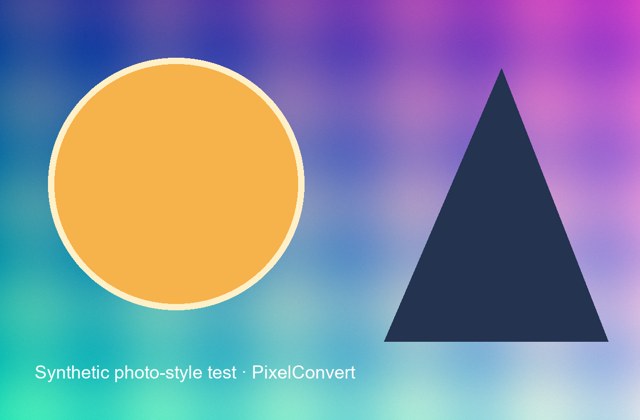
The test source carried EXIF orientation 6. The displayed derivative has upright pixels and no copied EXIF block.
- Source metadata
- EXIF orientation tag 6
- Output geometry
- 420×640 upright
- Output metadata
- Original EXIF block omitted
Reproduce the test
These deterministic PixelConvert files contain no personal photos or third-party artwork. Download them to repeat the measurements or test another workflow.
- Download the tagged source ↓
Synthetic 640×420 JPEG carrying EXIF orientation 6.
- Download the rebuilt output ↓
Upright 420×640 derivative written without the source EXIF block.

Browser and failure checks
- Current Chromium desktop
- The preflight reports detected metadata categories locally, before any file is transmitted to the server.
- Rebuild verification
- The output file was reopened after encoding to confirm the orientation had been applied to the pixels and the original EXIF block was not present.
- Conservative-scan behavior
- Unrecognised or vendor-specific blocks are not claimed as parsed; the interface reports categories detected rather than asserting a file is clean.
How this was tested
A synthetic JPEG received a standard EXIF orientation field, was reopened, transposed with Pillow's EXIF operation, and saved without supplying EXIF metadata. The resulting file was reopened to verify its orientation dimensions.
Read the full PixelConvert methodology →Limitations
- Metadata removal is not a forensic-anonymity guarantee; visible content can reveal a location or identity.
- Re-encoding without an ICC profile may affect specialized color-managed use.
- The client-side scan does not parse every vendor-specific or proprietary metadata block; 'none detected' is not a proof of absence.
Frequently asked questions
- Does my phone really record where photos were taken?
- If location services are enabled for the camera, yes — typically to within a few metres, stored in standard GPS fields that any image tool can read. It is not visible in the picture and most people are unaware it is there.
- Do social platforms remove metadata for me?
- Some do, some do not, and behavior differs between platforms and between the displayed copy and the stored original. Email attachments and file-sharing links generally strip nothing. Relying on the recipient is not a strategy.
- Will removing metadata make my photo anonymous?
- No. It closes one disclosure channel. The visible content — landmarks, house numbers, plates, reflections, recognisable people — is untouched and is usually what identifies a photograph.
- If I strip the orientation tag, will my photo be sideways?
- Not if the rotation was applied to the pixels first, which is what PixelConvert does. Stripping the tag from a file whose pixels are still stored rotated would cause exactly that problem, which is why the order matters.
- Should I always remove metadata?
- No. Photographers need capture settings, professionals need embedded copyright and attribution, evidentiary photos need provenance, and archives need everything. Keep the original intact and strip only the copy you are sharing.
- Is your metadata scan a guarantee that my file is clean?
- No, and we do not claim it is. The scan is deliberately conservative and does not parse every vendor-specific block. For situations where a mistake has serious consequences, verify with a dedicated forensic metadata tool.
Revision note: Reviewed 11 September 2026: added the breadth of a typical EXIF block, a dedicated section on GPS and aggregation risk, why the tool reports categories rather than values, when metadata should be kept, the limits of stripping, and a practical routine. The orientation measurement is unchanged.